


Sprunki Pyramixed New OC Upin Ipin
played 6 times119
Share game
Discover something different



More to mix
Sprunki
Sprunki Phase 3
Joy Garden
Sprunki Phase 4
Sprunked
Sprunki Wenda’s Dimension
Sprunki Phase 5
Sprunki Retake
Sprunki - Hyper Shifted Phase 3 Remastered
Sprunki Phase 7 Remastered
Sprunki Phase 8
Saving Funbot from Lava
Sprunki Double Date
Sprunki Mustard
Sprunki Mother’s Nature Port
Sprunki Wenda Treatment
Sprunkin
Sprunki Kiss Mod
Sprunki Phase 9

Sprunki Sad Mod
Sprunke Phase 4 Remastered Remake New Update
Meccha Chameleon
Sprunki Phase 11
Sprunki OC Real












What is Sprunki Pyramixed New OC Upin Ipin
Sprunki Pyramixed New OC Upin Ipin is a fan-made music mixing game where you can enjoy the Sprunki Pyramixed experience on a whole new level with characters based on Upin, Ipin, and Mail. Each character has a unique sound, beat, melody, or vocal effect, which lets you create unique musical combinations. Other game modes, like the Horror Mode, also modify character designs and animations to be creepy versions and include darker visual effects in the background.
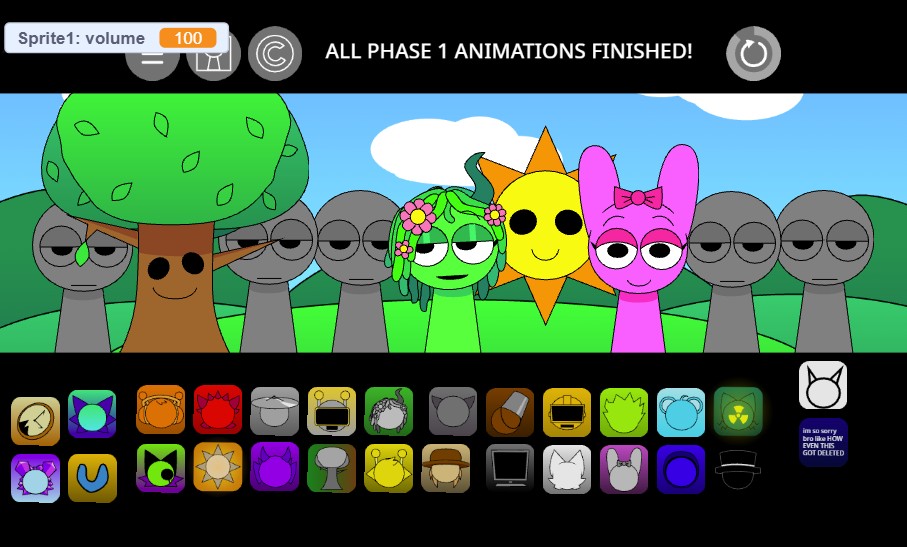
How to Play Sprunki Pyramixed New OC Upin Ipin
Start by selecting characters and placing them into the available positions. Each character adds a different sound to the track, so experiment with various combinations to discover interesting rhythms and melodies. Try removing and replacing characters to change the arrangement and create a track that matches your preferred style.
Horror Mode provides another way to experience the game. Switch to the darker version and experiment with the transformed characters to see how their unsettling animations and sounds change the overall atmosphere.
Controls Guide
- Mouse: Select and interact with characters.
- Click and drag supported. Drop characters into the mixing area.
- Change the music by adding/removing characters.
- Mode Controls: Press the buttons to cycle between Standard and Horror Mode.
- Reset: Rewind and try a totally different combination.
Pro Tips & Tricks
- Try different character combinations: Don't always use the same characters. Mixing various sounds results in surprising effects.
- Make the beat first: First, the beat characters, then the melodies and vocal effects.
- Hear the balance: Cut clashes - too many of the same sounds can make your track sound crowded.
- Try Horror Mode: The darker versions offer a different visual and musical experience worth checking out.
- Test characters one at a time. It is easier to understand what each sound adds if you add one character at a time.
- Try some mixes: There is no single perfect combination, so keep experimenting until you find a setup you like.