


Sprunki MSI ALIVE Little Update
played 5 times299
Share game
Discover something different






More to mix
Sprunki
Sprunki Phase 3

Joy Garden
Sprunki Phase 4
Sprunked
Sprunki Wenda’s Dimension
Sprunki Phase 5
Sprunki Retake
Sprunki - Hyper Shifted Phase 3 Remastered
Sprunki Phase 7 Remastered
Sprunki Phase 8
Saving Funbot from Lava
Sprunki Double Date
Sprunki Mustard
Sprunki Mother’s Nature Port
Sprunki Wenda Treatment

Sprunkin
Sprunki Kiss Mod
Sprunki Phase 9

Sprunki Sad Mod
Sprunke Phase 4 Remastered Remake New Update

Meccha Chameleon
Sprunki Phase 11
Sprunki OC Real












Introduction to Sprunki MSI ALIVE Little Update
Sprunki MSI ALIVE Little Update is a fan-made music game that mixes the well-known Sprunki formula with vivid characters, catchy sounds, and interactive animations. Players can drag different characters onto the stage and build tracks using beats, bass, melodies, vocals, and effects. Each combo creates a different musical result, and the animated cast reacts to the sounds as the track progresses. The Little Update keeps the original concept intact, while adding some smoother animations, cleaner transitions, and some small refinements that make creating music feel more polished.
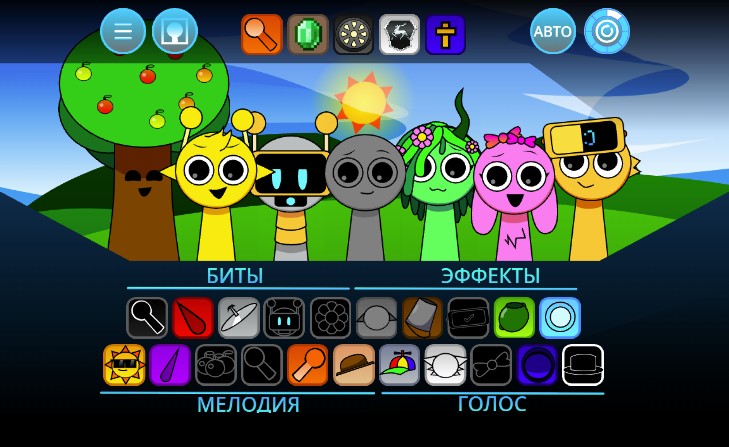
Key Features of Sprunki MSI ALIVE Little Update
- Drag-and-drop music creation: Build songs by placing sound characters on the stage.
- Multiple sound styles: Mix beats, melodies, vocals, bass, and atmospheric effects.
- Animated characters: Characters move and react to the music instead of simply standing still.
- Creative combinations: Experiment with different sound sets to discover unique mixes.
- Smooth presentation: Updated animation timing and transitions make the experience feel more fluid.
- Simple browser gameplay: The straightforward interface makes it easy to start creating music.
How to Play Sprunki MSI ALIVE Little Update
Gameplay
Start by selecting a character from the available sound icons and dragging it onto the stage. Each character adds a specific musical loop to your track. Combine several characters to create a complete rhythm, then remove or replace them whenever you want to change the sound.
Try different combinations instead of focusing on one type of sound. A strong beat can provide the foundation, while bass, melodies, vocals, and effects add more personality. Watch the characters as they react to your mix, and keep experimenting until you find a combination you enjoy.
Mouse and Keyboard Controls
Mouse:
- Left Click: Select a character or sound.
- Drag and Drop: Place a sound character onto the stage.
- Click/Drag: Remove or reposition characters when supported.
Keyboard:
The game is primarily designed around mouse or touch interaction, so keyboard controls may be limited. If additional shortcuts are available in your version, they are usually displayed within the game interface.
Why Players Love This Game
Sprunki MSI ALIVE Little Update is easy to understand but gives players plenty of room to experiment. It doesn’t require any advanced musical knowledge, so it is accessible to both casual players and Sprunki fans. The animated characters also add more personality to each mix, and the variety of sounds encourages players to keep trying out new combinations. The little improvements in this update make the experience smoother without taking away the charm of the original.