


Sprunki 3D RP Mod
played 1766 times3.15K
Share game
Discover something different




More to mix

Sprunki
Sprunki Phase 3

Joy Garden
Sprunki Phase 4
Sprunked
Sprunki Wenda’s Dimension
Sprunki Phase 5
Sprunki Retake
Sprunki - Hyper Shifted Phase 3 Remastered
Sprunki Phase 7 Remastered
Sprunki Phase 8
Saving Funbot from Lava

Sprunki Double Date
Sprunki Mustard
Sprunki Mother’s Nature Port
Sprunki Wenda Treatment

Sprunkin
Sprunki Kiss Mod
Sprunki Phase 9

Sprunki Sad Mod
Sprunke Phase 4 Remastered Remake New Update
Meccha Chameleon
Sprunki Phase 11
Sprunki OC Real












Overview Sprunki 3D RP Mod
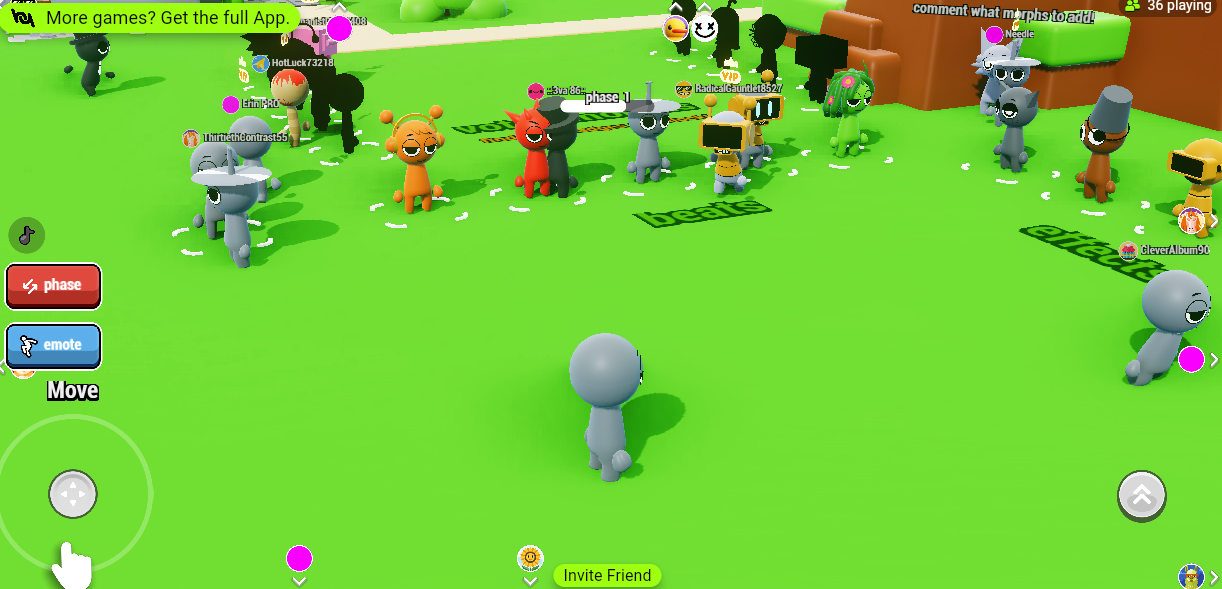
The Sprunki 3D RP Mod is a fan-made modification of the popular Sprunki 3D Mod universe, designed to provide a 3D role-playing experience. This mod transforms the usual 2D environment of Sprunki into an immersive 3D world where players can interact with various elements, characters, and environments, as well as explore new areas while completing missions or simply hanging out.
How to Play the Game
- Character Creation: Start by customizing your Sprunki character. Choose features like clothing, accessories, and facial expressions to personalize your avatar.
- Exploration: Move around the 3D world by walking or driving. Navigate through different zones or areas.
- Role-playing: Engage in role-playing scenarios by interacting with NPCs (non-playable characters) and other players. Complete quests, join activities, or simply chat and socialize.
- Mission System: Some mods might include a mission system where you can perform tasks to earn rewards like in-game currency or items.
- Mini-Games & Challenges: Participate in mini-games and challenges scattered throughout the world for extra fun.
Gameplay and Mouse
- Mouse Controls:
- Left Click: Interact with objects, open doors, or initiate conversations.
- Right Click: Sometimes used for additional actions or context menus.
- Scroll Wheel: Zoom in/out or change camera angle.
- Movement Controls (Keyboard):
- W, A, S, D: Move your character around.
- Spacebar: Jump.
- Shift: Sprint.
- E: Interact with objects or NPCs.
- F: Toggle actions or other special features.
- Camera: Use the mouse to look around and adjust the camera angle to get a better view of your surroundings.
Tips to Win
- Master Movement: Practice navigating through the 3D world to get comfortable with the controls. A smooth movement will help you complete missions or explore more efficiently.
- Talk to NPCs: Engage with the NPCs to gain valuable information or missions that can give you rewards.
- Explore Hidden Areas: Look for hidden items, secret paths, or special locations in the world. These can lead to exclusive rewards or shortcuts.
- Complete Missions: Focusing on mission objectives will help you earn points or in-game currency, which can be used to upgrade your character or unlock special abilities.
- Customize Your Character: Customize your avatar’s appearance, clothing, or skills to suit your playstyle and stand out in the 3D world.